Commands Beyond the Slate: Myst V: End of Ages (2005)
Encrypted settings, embedded Python, and an urwin waiting in Direbo
Part 5 of 5 in Behind the Ages
The End of Ages Graph maps the Classic points and links stored by Myst V. Beneath those files, Cyan Worlds’ Plasma engine also kept its console commands and its embedded Python interpreter, both still reachable without patching the executable. [Node labels such as Kver:69 have a thick underline, in the color of their Age, and open that place in the graph browser of the game.]
Myst V was made by Cyan Worlds with Plasma, the engine of Uru. Its developers typed commands into a console while they built it. The game that shipped has no console to open, but it kept the commands, and it still reads the file that can put them on the keyboard. I checked each finding below against The Cutting Room Floor, the Guild of Writers, Mystlore, PCGamingWiki and libHSPlasma, and credit earlier documentation where a finding builds on it. [Version of the game: Myst V: End of Ages, release 2.0.0.9 for Windows.]
Developers’ Commands on the Player’s Keys
How to reach it.
In the game’s settings folder,
Documents\My Games\Myst V End of Ages\init\, create a text file whose name ends in.fni, holding these two lines. On a Mac running the Windows edition, use the Documents folder exposed to that game:Keyboard.BindConsoleCmd 4 "Graphics.Renderer.SetYon 5" Keyboard.BindConsoleCmd 6 "Graphics.Renderer.SetYon 100000"Encrypt it the way the game’s own files are encrypted: the tool PlasmaCrypt of libHSPlasma does it, with
PlasmaCrypt aesand the name of the file. The same lines left in plain text do nothing.Start the game, continue a game, and choose the navigation mode Free-Move (Advanced) in its options (Controls), referred to as Free Roam below: in the two Classic modes, the bound keys do nothing.
Press 4: the room dissolves into its fog. Press 6 to bring it back.
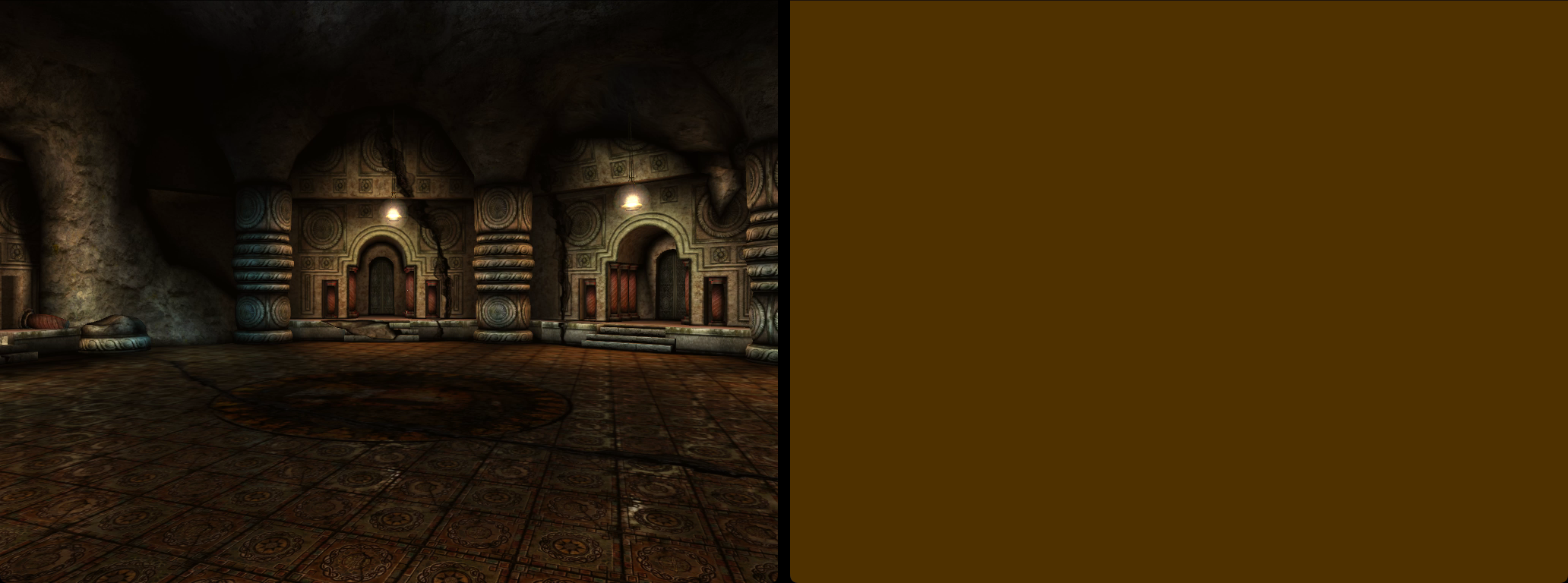
Before and after the key 4, Graphics.Renderer.SetYon 5: the far limit of the view five units away, and the fog over everything.
The game reads two kinds of settings files from that folder: .ini files when it starts, before the keyboard is ready, and .fni files afterwards. Its own .fni files, one for each Age, set the fog and the light with the same kind of lines. Each line is a command of the console, and the build sold to players kept Keyboard.BindConsoleCmd, “Bind console command to key”, with the rest. Its table has no function keys; digits and letters work.
The folder is documented on PCGamingWiki, the encryption is published in libHSPlasma, and players of Uru knew .fni files as lists of console commands.1 What appears to have gone unnoted is that the shipped Myst V obeys a player’s own .fni file in that folder and allows console commands to be bound directly to keys.
A Key That Runs the Player’s Python
How to reach it.
Add to the file of the previous find the line
Keyboard.BindConsoleCmd 9 "Python.RunFile probe", and encrypt it again.Put a Python file named
probe.pyin the folderPythonof the game, with these lines:import sys, Plasma f = open('probe-out.txt', 'a') f.write('Current Age: %s\n' % Plasma.PtGetAgeName()) f.close() del sys.modules['probe']Start the game, continue a game in Free Roam, and press 9. The game appends its current Age to
probe-out.txtin its installation folder. Pressing 9 again adds another line.
Among the commands that the build kept is Python.RunFile, “Run the specified Python file program”. It imports the file by its name and runs it with the game’s own Python, version 2.3, inside the game. A short test file wrote down the folders of the game’s Python and the Age where the player stood, K’veer. A second one read a position from a text file and moved the player there at once, from the first room of K’veer to the room of the slate (Kver:69). The game imports a file once: for its key to run it again, the file must remove itself from sys.modules at its end, as the files of the next finds do.
In the engine Cyan published in 2011, player builds omit RunFile altogether: the group of Python commands holds only a single command for the log level.
The Developers’ Back Doors Still Answer
How to reach it.
Add to the file of the first find the line
Keyboard.BindConsoleCmd 2 "Python.RunFile dialog", and encrypt it again.In the folder
Pythonof the game, put a file nameddialog.pyholding these three lines:import sys sys.modules['nanoBlackBarBodyPythMenuBar'].glue_inst.OnBackdoorMsg('testNotify', '') del sys.modules['dialog']Continue a game in Free Roam and press 2. Ok closes the box; the game goes on.
Each script of a Plasma game can answer messages that its developers sent from their console, in a function named OnBackdoorMsg. In Myst V, 45 scripts have one. The command that sent them, Python.Backdoor in the engine that Cyan published, is not in the build sold to players. But a player’s file runs in the same Python as the game’s scripts, where each of them can be found by name and called.
The menu bar’s answer to “testNotify” (“Sending test notify message…”) opens a dialog with the game’s quit warning: “Are you sure you want to quit Myst V?” It offers a single answer, “Ok”. The choice is refreshingly limited.

The menu bar’s answer to “testNotify”: the quit question, with one answer.
Beside it, the message “yoyoyo” was to open a box with the buttons Yes and No and the words “Yo yo yo”. It fails: the function it calls, PtYesNoDialog, is not in the game’s Python, and Python stops on its name. Another door was tried in Todelmer: “season” fast-forwards the season, and the starry sky starts to turn. The others were not tried; the lines they write in the developers’ log speak for them, such as “Unlocking MYST book… (MAY CAUSE SIDE EFFECTS)” in K’veer, or, in Tahgira, a warning that the cheat “will break some things”.
The Test Journal, Opened
How to reach it.
Add the line
Keyboard.BindConsoleCmd 1 "Python.RunFile journal", and encrypt the file again.In the folder
Pythonof the game, put a file namedjournal.py:import sys, Plasma text = Plasma.PtGetLocalizedString('Global.JournalBooks.TestBook', []) menu = sys.modules['nanoBlackBarBodyPythMenuBar'].glue_inst book = Plasma.ptBook(text, menu.key) book.setGUI('BkBook') book.show(0) sys.modules['__main__'].book = book del sys.modules['journal']Continue a game in Free Roam, press 1, and click the cover. A click beside the book closes it.
The Cutting Room Floor found it: among the texts of the game, a single journal that no Age uses, named TestBook, whose cover is a texture of Uru: The Path of the Shell that Myst V does not have. It printed the journal’s text, and showed it in a mockup, in place of the text of one of Yeesha’s journals.
The file asks for the journal the way the game asks for Yeesha’s. The book appears closed, in a plain brown leather: since the cover it names is missing, the game puts its default cover in its place, a texture that The Cutting Room Floor lists among the unused ones (“This can’t occur in the game”). A click opens it on four lines in plain Arial: “Test Journal Book”, “Even More text!”, “Left Item”, “Right Item”. Not quite Yeesha’s usual prose.
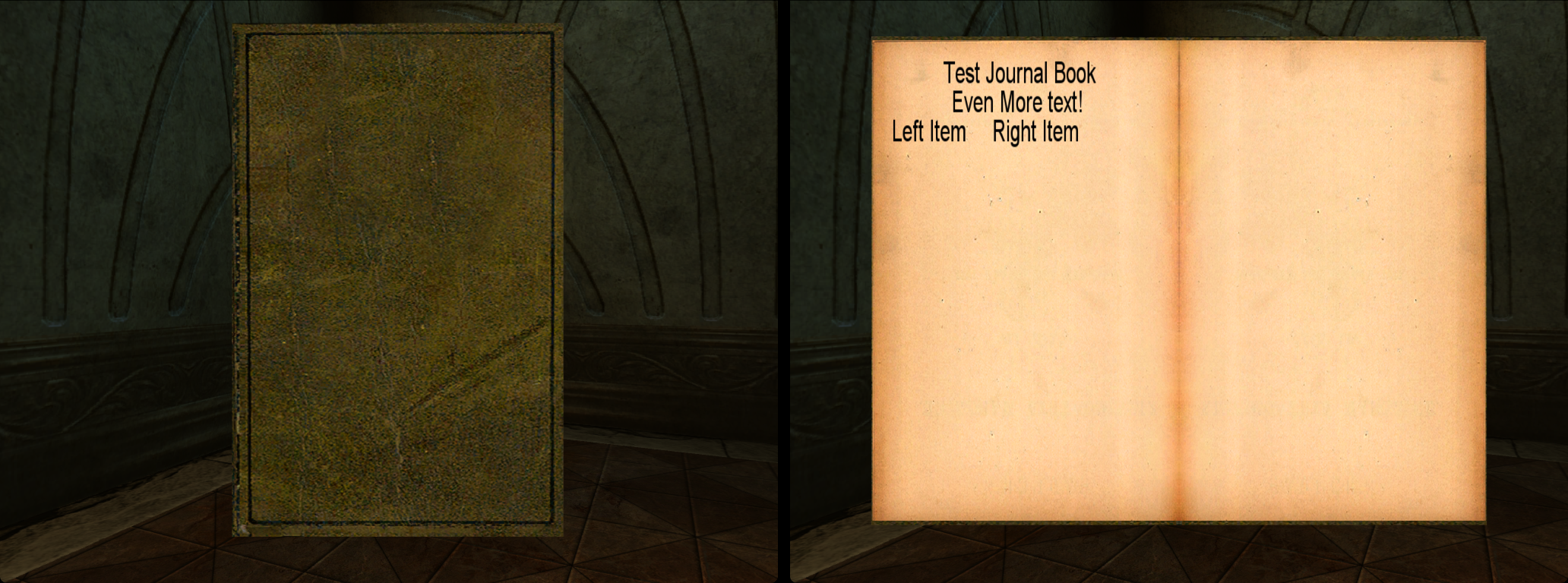
The TestBook in the game: the default cover in place of the one it names, then its text.
The Urwin of Direbo
How to reach it.
Add the line
Keyboard.BindConsoleCmd 5 "Python.RunFile urwin", and encrypt the file again.In the folder
Pythonof the game, put a file namedurwin.py:import sys, Plasma Plasma.PtLoadAgePage('Direbo', 'drboUrwinShape', 0) del sys.modules['urwin']In Direbo, in Free Roam, look toward the middle of the Age and press 5.
The Cutting Room Floor tells the story: an urwin, the creature that later lived in Uru Live, was to be in Direbo, and time ran out. The game’s files still hold its model, two animations, idle and walking, and unfinished code to bring it in, copied from the code of the Bahro. The page of The Cutting Room Floor asks for screenshots of it placed in the game.
The file of Direbo lists the urwin’s three pages, marked to load only when a script asks for them, as are the pages of Esher’s scenes; no script asks. The call that the scripts of the Bahro use to load their own pages loads it at once. The urwin stands in the middle of Direbo, among the rock pillars and between the bridges, its head far above the player. It stays still, in the pose in which it was modeled: its animations are on the two other pages. The console’s own command for pages, Data.QueueLoadAgePage, put on a key, does not show it.

The urwin in Direbo, seen from the edge of the Age (Drbo:71), once its page is loaded.
Conclusion
Where Revelation’s console required patching a library, Myst V shipped without an interactive console yet still obeys an encrypted .fni file in the player’s own init folder, bringing back its key bindings and its embedded Python interpreter intact. Once Python runs inside the game, the rest of the studio’s workbench opens up: 45 developer back-door handlers, a test journal wearing its fallback cover, and Direbo’s cut urwin standing right where Cyan left it.
PCGamingWiki gives the folder; libHSPlasma holds the method and the key, and its PlasmaCrypt writes them. On the Guild of Writers’ wiki, the Offline KI, a set of commands written by players for Uru: Complete Chronicles, runs “Uru console commands, like those possible in fni files”. ↩︎